The quick answer
Install Cart to Link, enable its Safari extension and allow your Amazon website plus carttolink.com. Open your cart directly in Safari, run Cart to Link from Safari’s extensions menu and tap Create share link. Copy the link into a message.
Already have the Amazon app? You can keep it installed. Cart sharing runs on the Amazon website in Safari. If an Amazon link opens the shopping app, open Safari yourself and type or paste the cart address into its address bar.
1. Install Cart to Link
Download Cart to Link from the App Store and open it once. The same app supports iPhone and iPad and includes the Safari extension. You do not need a separate Cart To Link account.
The app shows the setup instructions. You create links while browsing your Amazon cart in Safari.
2. Turn on the Safari extension
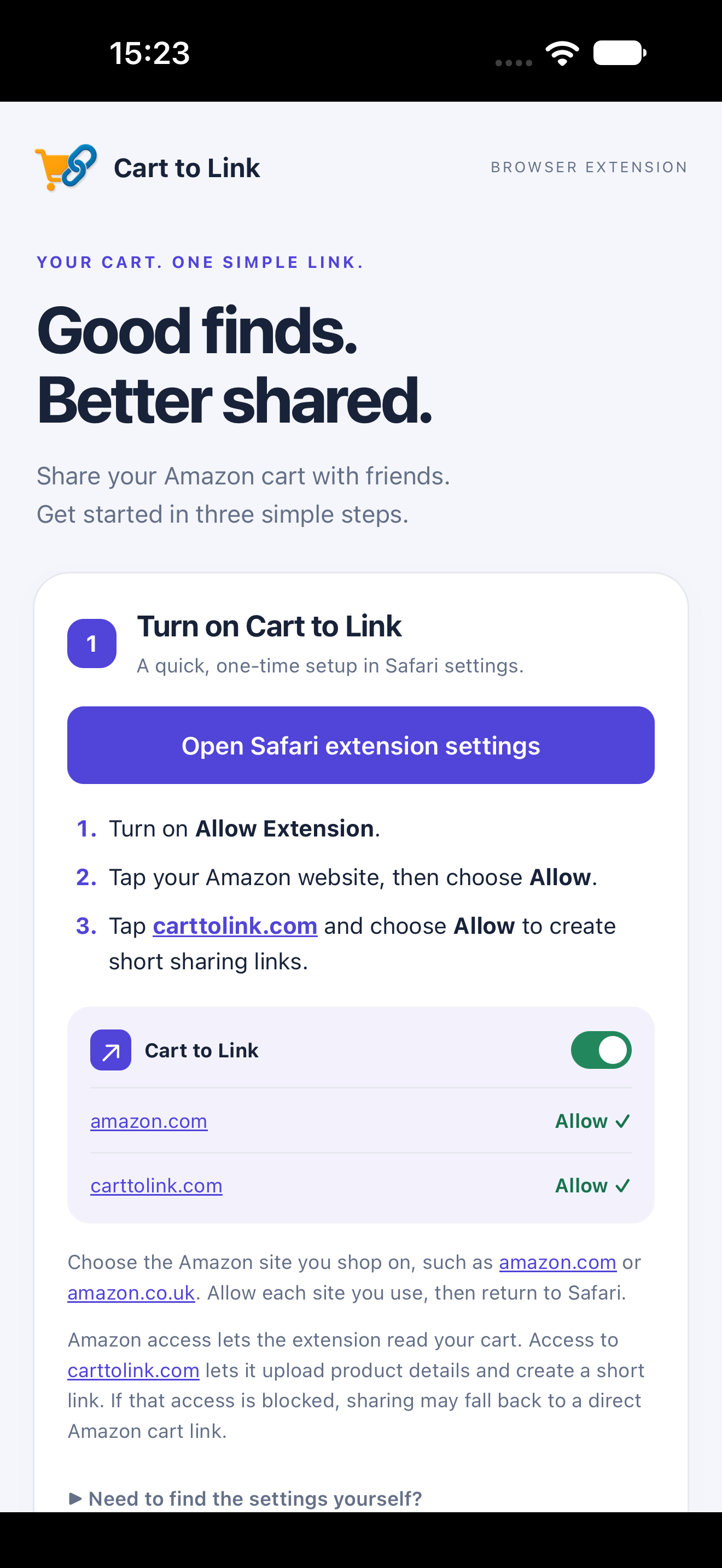
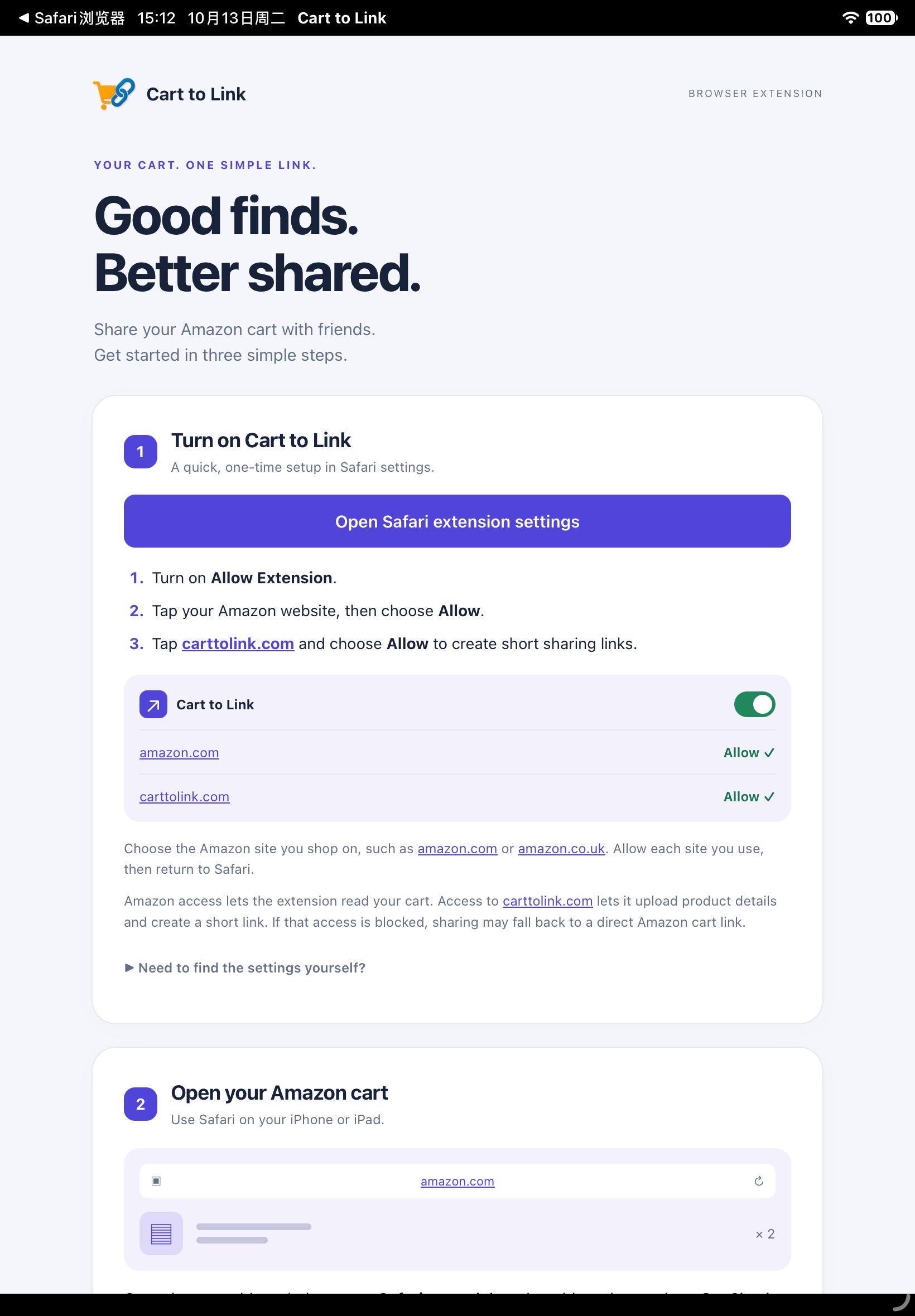
In the Cart to Link app, tap Open Safari extension settings where available. If it shows instructions or takes you to the Settings home screen, follow the manual path below.
| Your system | Where to find the extension |
|---|---|
| iOS / iPadOS 18 or later | Settings → Apps → Safari → Extensions → Cart to Link |
| iOS / iPadOS 17 or earlier | Settings → Safari → Extensions → Cart to Link |
Turn on Allow Extension. The app’s direct settings shortcut uses Apple’s extension settings API on iOS and iPadOS 26.2 or later; the manual path remains useful if the shortcut does not open the expected screen.
3. Allow both websites
In Cart to Link’s Safari extension settings, allow access to:
- The Amazon website you use, such as amazon.com, amazon.co.uk or amazon.com.br. This lets the extension read your cart.
- carttolink.com. This lets the extension send product details to Cart To Link and create a short sharing URL.
Each Amazon country domain needs its own permission. If your country’s website is not shown yet, visit it in Safari, open the extension and respond to the website access prompt. You can then check that site’s permission again in Settings.
Getting an Amazon URL instead of a Cart To Link URL? Check access to carttolink.com. When that access is blocked, sharing may fall back to a direct Amazon cart link. A Cart To Link short URL opens a product list that recipients can review.
Creating a short link uploads product details, including identifiers, names, quantities, prices and images. Anyone with the generated link can view those products. Read the Privacy Policy before sharing a sensitive list.
4. Open your Amazon cart in Safari
- Open the Safari app on your iPhone or iPad.
- Type your Amazon website into Safari’s address bar and sign in directly on Amazon.
- Open the cart, wait for the products to load and scroll through the full list.
For the US marketplace, you can copy this address and paste it into Safari:
https://www.amazon.com/gp/cart/view.html
For another marketplace, open that country’s Amazon website and its cart. Copying the US address does not move products from another country’s cart.
The Amazon app and Safari may have different sign-in sessions. Make sure Safari shows the account and products you intend to share.
5. Open the extension and create your link
On iPhone: open Safari’s page menu beside the address bar, then choose Cart to Link from the extensions controls. The menu icon and position vary with your Safari version.
On iPad: look for the extensions icon beside the address bar, or open Safari’s page menu and choose Cart to Link. In a narrow window or Split View, the controls may be grouped into a menu.
- Check the cart item count and estimated total shown by the extension. Distinct product count and total quantity may differ.
- Tap Create share link.
- Use the copy control for the generated URL and paste it into Messages, WhatsApp, email or your preferred chat.
- Open the copied link once and check that the products and quantities match what you meant to share.
If the extension reports that it cannot reliably read the cart, use the checks below before sharing. A visible Amazon subtotal alone does not confirm that every product has been read.
What your friend does with the link
Your friend opens the Cart To Link page in a browser. They can view the products without installing the extension or signing in to Cart To Link, select products and change quantities before continuing to Amazon.
The product links use the original Amazon country. Amazon may ask the recipient to sign in; they review availability, delivery, quantities and final prices in their own Amazon cart before ordering. Sharing a link does not place an order.
To share a revised selection, use the shared page’s new-link control. This creates a separate URL for the selected products and quantities.
If something does not work
Cart to Link is missing from Safari’s menu
Open the Cart to Link app once, check that Allow Extension is on, then return to an Amazon page in Safari. Reopen the page or Safari’s menu. Apple’s Safari extension instructions show where to manage extensions.
Amazon keeps opening in the shopping app
Open Safari manually and type the Amazon website or paste the cart address into the address bar. Sign in there and open your cart. The sharing extension is available in Safari’s menus.
The extension shows no items, a dash or a read error
Confirm access to the Amazon domain you are currently visiting. Refresh the cart, wait for it to finish loading, scroll through all active products and reopen Cart to Link. Request Desktop Website can change the layout, but does not resolve every read error. Saved-for-later items and recommendations are not the active cart.
A short link is not created
Allow carttolink.com as well as the Amazon domain, check your internet connection, reload the cart and reopen the extension. If a direct Amazon link appears, check the Cart To Link permission again. If the error persists, send support the exact error text, Amazon country, device and Safari version.
The total differs from Amazon’s checkout price
Shared totals are estimates. Prices, stock, selected options, discounts, delivery and tax can change. Review each product and the final total on Amazon. Some shared prices can refresh where price data is available.
My country’s Amazon website is not in Settings
Open that country’s website in Safari and check the extension’s access prompt. Allow the domain you actually use and carttolink.com. See the supported marketplaces and regional sharing guide.
Still stuck? Contact support with the exact message, device, Safari version and Amazon marketplace. Avoid including account, payment or delivery details in screenshots.
About the screenshots and setup steps
The screenshots show the Cart to Link app’s actual setup interface captured in iPhone and iPad simulators. They show where to start; the permission rows inside the app illustrate the choices to make in Settings. Safari’s menus and permissions can look different by system version and device.
Apple documents Safari extension management and the extension settings shortcut introduced in Safari 26.2.